

Pianotlbosx Satin Ribbon Printing Machine with Holder+USB &APP+Bluetooth,Upgrade 300 Dpi Digital Ribbon Printer Thermal Label Printer Foil Stamping Printing Machine, Support Multiple Languages
$299.99



Price: $299.99
(as of Jan 20, 2026 16:03:17 UTC – Details)
Product description
The video showcases the product in use.The video guides you through product setup.The video compares multiple products.The video shows the product being unpacked. Satin Ribbon Printing Machine Merchant Video


1 Package List 2 Install Ribbon 3 Scrap Recycling 4 Install Satin 5 Connect Cables
The video showcases the product in use.The video guides you through product setup.The video compares multiple products.The video shows the product being unpacked. How to print via Bluetooth? Merchant Video
The video showcases the product in use.The video guides you through product setup.The video compares multiple products.The video shows the product being unpacked. Label Printer Driver Quick Installation Merchant Video

Gift & Packaging
Packaging Decorations
Used to make beautiful bows and decorate gift boxes.

Food & Cake Decorations
Food Packaging
Tying ribbons to cakes, especially the base, can enhance their appearance

Birthday & Wedding
Party Decorations
Used to decorate wedding invitations, place cards, bridal bouquet handles, and as decorations.

Fashion & Clothing
Handicrafts
Used as belts, decorations on hats, or sewn into clothing as embellishments.

Celebrations & Events
Graduation Ceremony
Use different colored ribbons can be used to hang honorary medals or decorate corsages.
1 Gift Decorations
2 Baking Decorations
3 Party Decorations
4 Fashion Decorations
5 Celebrations Decorations
What width of satin can the satin ribbon printer print?
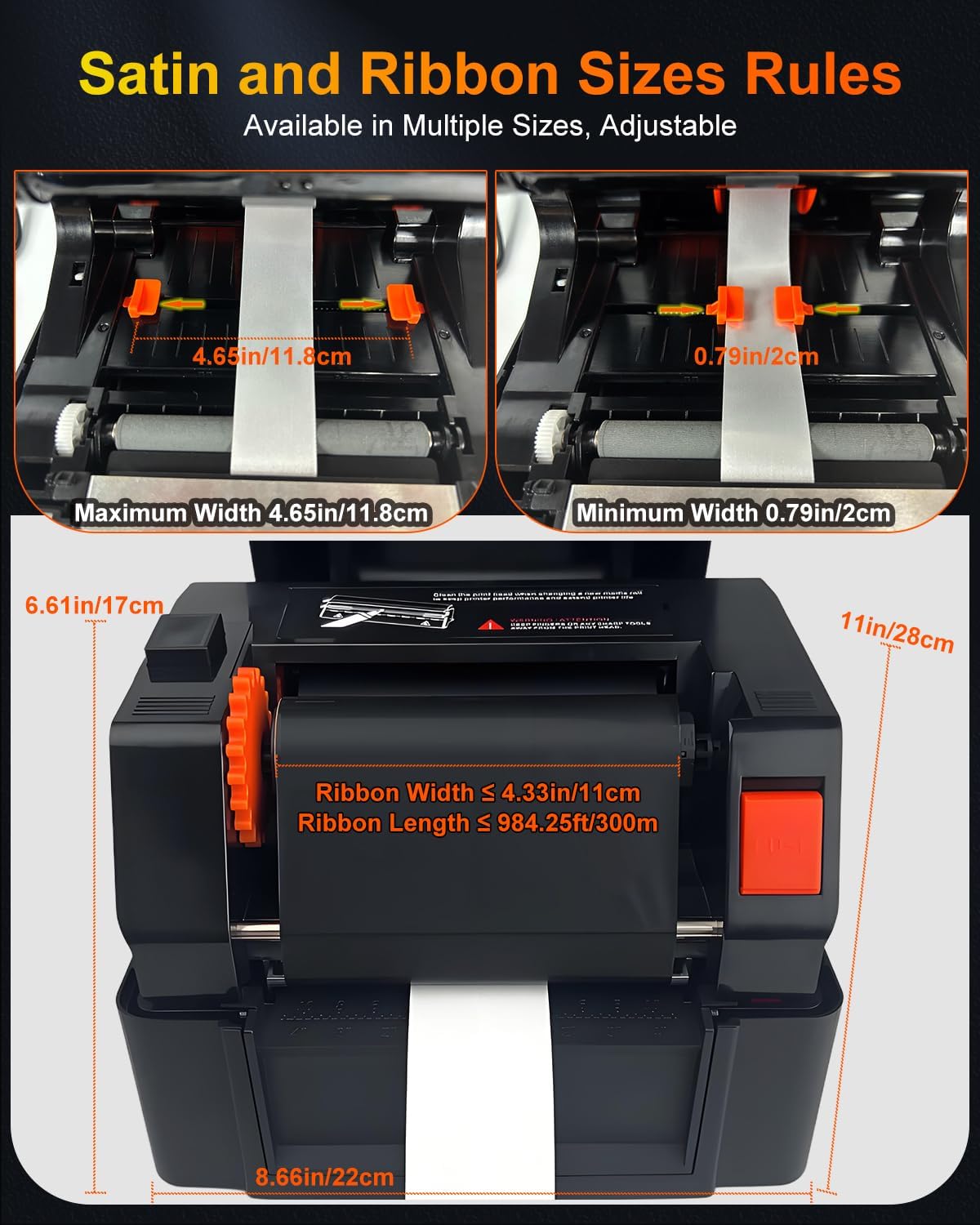
The satin ribbon printer supports satin widths from 0.79in/2cm to 4.65in/11.8cm.
How do I download the driver?
Please open (printer2688) in a web browser. Download is entirely in English.
Why can’t I connect to my phone via Bluetooth?
First, turn on your phone’s Bluetooth. Then, in the app, select (Me)-(My Devices) and find the printer (Label Printer3).
Why did the editing software download fail?
Note: Be sure to turn off your antivirus software before downloading the editing software.
Does the ribbon printer support multi-row printing?
Yes. Take out the included Satin Dividers and attach them to the ribbon clips. Secure multiple rows of ribbon in sequence.
Why doesn’t the satin print continuously during printing?
Open the editing software, select Settings and Properties in Print, choose Continuous in Label Type, and select the number of copies to print.
Why is my satin printing unclear?
To print satins, you need to set the speed and density to determine the print quality. In the editing software, select print, then settings, then properties, and click to slow down the speed and increase the density.
What kind of thermal transfer ribbon should I buy for this ribbon printer?
The thermal transfer ribbons we purchase must be resin-based, wax-based, or a hybrid type to achieve good printing results. If you have any questions, please feel free to find us in the buyer messages. We are always ready to help you!
【Personalize Satin Ribbons with Meaningful Messages】- Transform plain ribbons into heartfelt keepsakes by printing custom phrases like “Happy Birthday,” “Season’s Greetings,” or “Just Married.” Perfect for adding a personal touch to gift wrapping, holiday decorations, or special event favors — turning everyday moments into memorable experiences.
【Enhanced 300 DPI Clarity & Bluetooth Convenience】- Enjoy crisp, professional-quality prints with 300 DPI resolution and seamless Bluetooth connectivity. Works with our user-friendly app and supports both Windows and mac0S systems. The interface automatically adjusts to your system language (15 options available), and includes an English manual and step-by-step video guide for quick setup.
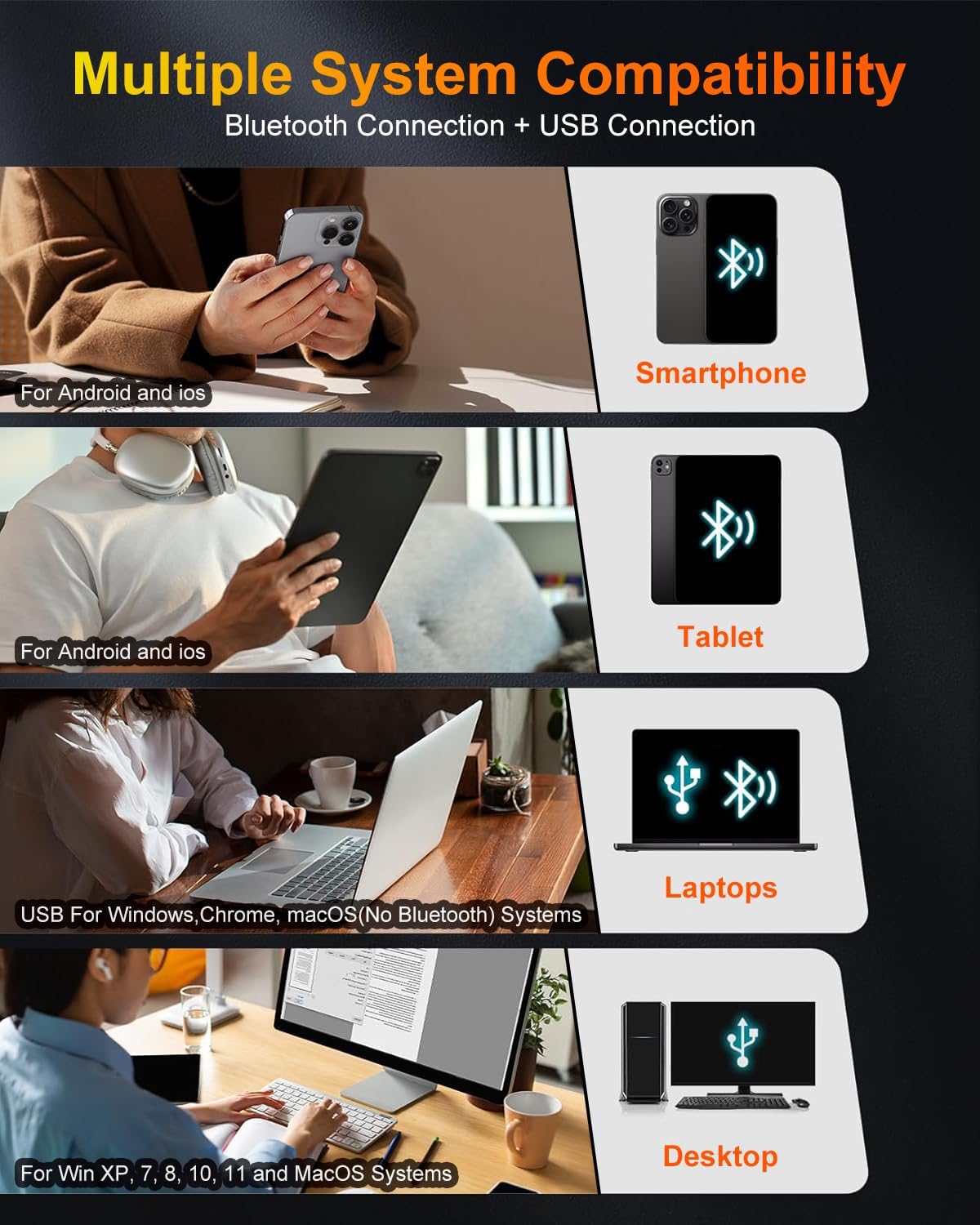
【Flexible Connectivity & Multi-OS Support】- Connect via USB or Bluetooth to compatible devices including Windows PCs (XP to 11), mac0S computers, and Android/i0S smartphones. Note: The printer’s Bluetooth function no compatible with mac0S laptops. Designed to fit effortlessly into your digital lifestyle, whether at home or in your studio.
【Adjustable Multi-Row Ribbon Printing】- Comes with three ribbon dividers for easy switching between single, dual, triple, or quadruple-row printing. Create up to four parallel ribbons in one pass — perfect for event favors, craft fairs, or small business use — saving time and expanding creative possibilities.
【Fade-Resistant & Long-lasting Print Quality】- Using thermal transfer technology, this printer produces smudge-proof, water-resistant ribbons that withstand heat and handling. Compatible with resin-based and mixed ribbons, it’s also great for creating care labels on clothing or accessories — built to last through use and display.
【Create One-of-a-Kind Gift Accents】- Design custom ribbons to elevate gift-giving for birthdays, weddings, or holidays. Use them on bouquets, cake boxes, party décor, or handmade cards — making every present feel uniquely personal and thoughtfully crafted.
【Versatile Uses for Every Occasion】- Print anything from text and logos to simple single color graphics — perfect for gift wrapping, wedding souvenirs, birthday parties, seasonal events, or brand promotion. A must-have for small businesses, crafters, and home decorators looking to add a custom flair to their projects.
User Reviews
Be the first to review “Pianotlbosx Satin Ribbon Printing Machine with Holder+USB &APP+Bluetooth,Upgrade 300 Dpi Digital Ribbon Printer Thermal Label Printer Foil Stamping Printing Machine, Support Multiple Languages”
Related Products




$299.99
There are no reviews yet.